

An enlightened approach to your data.
Give Dashbud your spreadsheets, your giant ERP exports, your SaaS APIs. Dashbud gives you the ability to produce the answers you need.
We built Dashbud to fulfill the promise of business data analysis.
Multiple data sources
A flexible, organized, scalable approach to connecting, storing, and accessing data.
AI-powered reporting
A user-friendly, AI-enabled interface that gives anyone the power to answer data questions and generate professional-quality reporting.
Scales with your needs
An system that scales from one user to a whole organization, with thoughtful attention to data security and governance.
AI without the AI problems
A system that avoids the pitfalls and perils of AI-based workflows and DIY reporting.
How it works
Import files or connect data sources: spreadsheets, databases and warehouses, APIs, and system exports.
Dashbud's data modeling agent learns your data's structure and business context.
Ask questions in plain language. Dashbud's data analyst agent answers your questions and generates tables, charts, and reports for you.
Please show me monthly DTC profits by region.

Total profit for each region on a monthly basis, computed as the difference between unit price and unit cost for all items ordered through the DTC channel, grouped by region and month.
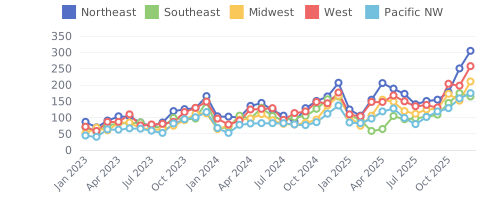
Create reports and dashboards for your own use; share them with your team and stakeholders.
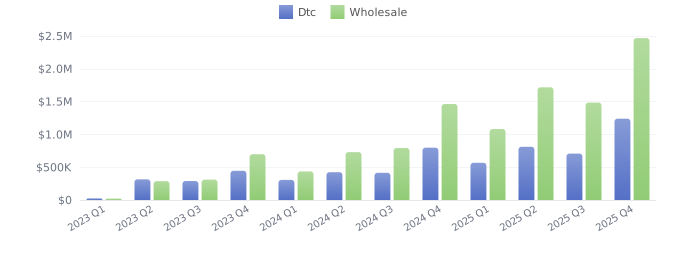
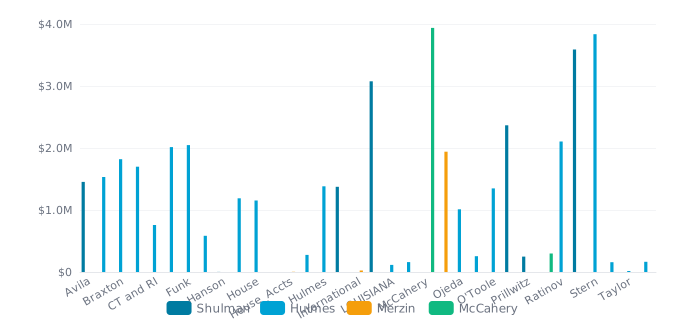
Dashbud is for...
Organize your data better; combine data from all your sources: files, cloud APIs, and external data stores.
Manage data access so your team gets the data they need. Create shared reporting and put the power to answer questions in everyone's hands. Keep sensitive data private and secure.
Access data from diverse data sources such as data lakes, legacy systems (ERP, CRM, EMR, etc.), and SaaS platforms. Smart governance features allow you to provide access with confidence.
Scale access and governance to the enterprise, putting power in the hands of users. Give time back to your data team to answer the hard questions, not simple reporting requests. Deploy Dashbud in your own cloud for compliance.
How does Dashbud compare?
Every approach to data analytics forces you to choose between power and simplicity, or between speed and trust.
| Approach | The Tradeoff | With Dashbud |
|---|---|---|
| SaaS Dashboards QuickBooks, Google Analytics, etc. |
|
|
| BI Tools Power BI, Tableau |
|
|
| Spreadsheets Excel, Google Sheets |
|
|
| AI Workflows Claude, ChatGPT |
|
|
- +Built in, no setup
- − Clunky interfaces
- − Siloed: can't mix data sources
- ✓Well-designed conversational interface.
- ✓Works across multiple data sources.
- +Powerful, enterprise-grade
- − Hard to learn, expensive
- − Often require a data team or dedicated resource
- ✓Same analytical power and polished display formatting.
- ✓Interactive charts and dashboards out of the box.
- ✓Weeks of platform training not required.
- +Flexible
- +Existing expertise
- − Time-consuming to update
- − Hard to share, competence penalty
- ✓Flexible reporting without the fragility.
- ✓Built-in data updates, versioning, rollback.
- +Fast and surprisingly capable
- −
- −
- −
- ✓Calculations are auditable SQL queries, not black-box AI.
- ✓Shared business rules and assumptions.
- ✓Dashbud's agent does not see your raw data, ever.
Designed for privacy, security, and trust
Enterprise: Deploy Dashbud in your own cloud
For organizations where data can't leave the building, Dashbud can run entirely inside your cloud account. Same product, running on your own infrastructure.
Ready to see your data in a new light?
Connect your data and start building reports in minutes — not months.